
Capture or paint depth
Use a heightfield layer from the PixelEra Play Area actor to define depth on the plane by automatically capturing the depth on all visible meshes, then use the in-editor painter to fine tune it or create it the heightfield from scratch.
1. Choose the depth channels
For a standalone field, set the row to Heightfield Only and enable the channels you need. For a texture or render target, keep that source and route its color channels to the depth channel you will paint.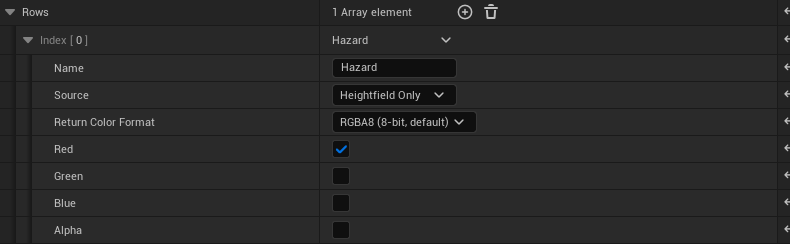
- Enable the channels you needEnabled channels return 1 inside and 0 outside their painted interval.
2. Capture the scene
Select the Play Area. Under Scene Capture, choose Target Row and Write Channel. Hide unwanted meshes in the World Outliner. Click Capture Scene, wait for processing, then Save Field. No special mesh materials are needed.
- Choose the destinationTarget Row is zero-based. Write Channel selects R, G, B or A.
- Capture, then saveHide unwanted geometry in the Outliner first.
3. Paint or adjust it
Click Open Painter. Select the row and channel. Choose Set, Raise, Lower, Erase, or Smooth. Adjust Radius and Falloff, then drag over the plane. Save when finished.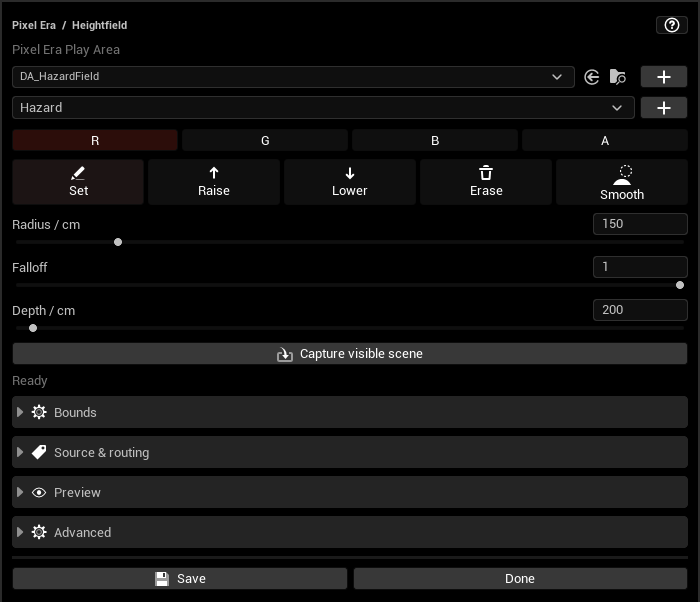
- Channel and brushChoose R/G/B/A, then Set, Raise, Lower, Erase or Smooth.
- Brush size and falloffAdjust these before dragging across the plane.
4. Choose height storage
Select Height Storage in the asset: 8-, 16-, or 32-bit. Return Color Format separately selects RGBA8 or RGBA16F.
- Stored depth precision
5. Set runtime resolution
Choose Runtime Resolution and save. Your original capture stays editable at its authoring resolution.
- Runtime sizeLower this without losing the original authoring data.
Updated Oct 17, 2026