
GPU-only reads: Niagara
Perform read requests in Niagara and obtain the result in the system immediately, results can be reused across many different Niagara systems + Material Graphs at no additional cost.
1. Set up the parameter
Create a one-slot ledger key using Share a color on the GPU. Set your emitter to GPU Compute Sim and spawn one particle. Add a user parameter of type Pixel Era GPU Ledger. Assign its Ledger, Request Key, and Source Texture.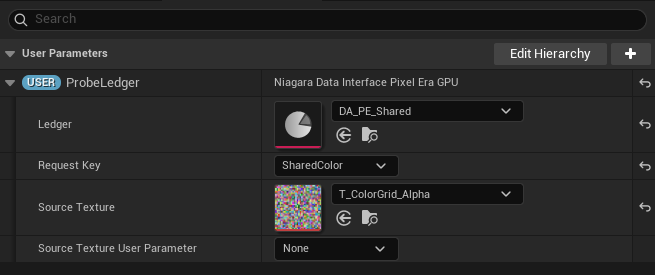
- Assign the ledgerUse the asset containing SharedColor.
- Choose the sourceRequired for Read Global; not required for Receive.
2. Read and use the color
Add Pixel Era: Read Global in Particle Update. Bind GPU Ledger to your user parameter, set UV, and keep Key Offset at 0. Add a later Set Particles.Color module and bind its color to Read Global’s Output Color.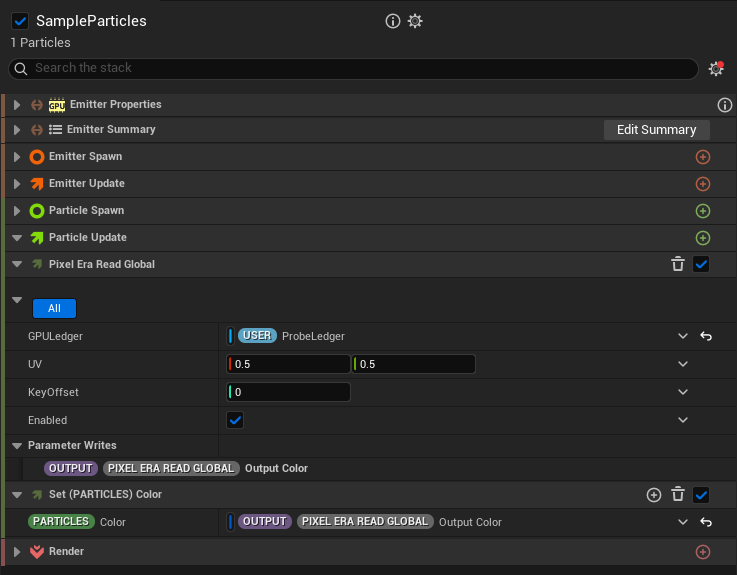
- Bind the user parameterProbeLedger is this example’s user parameter.
- Use Output ColorBind it to Particles.Color or another compatible input.
Receive an existing key
Use Pixel Era: Receive instead, bound to the ledger parameter. Its Output Color works the same way.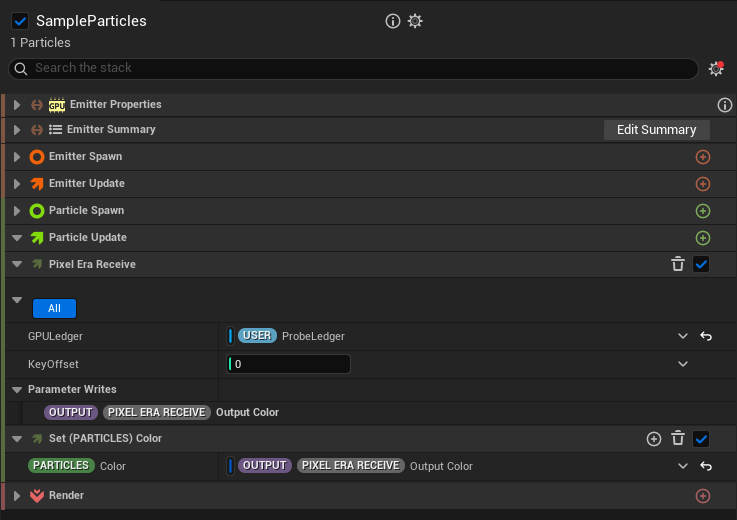
- Receive the shared valueBind Output Color in the same way.
Updated Oct 17, 2026