
Combine several bakes
Merge compatible banks while keeping all source points.
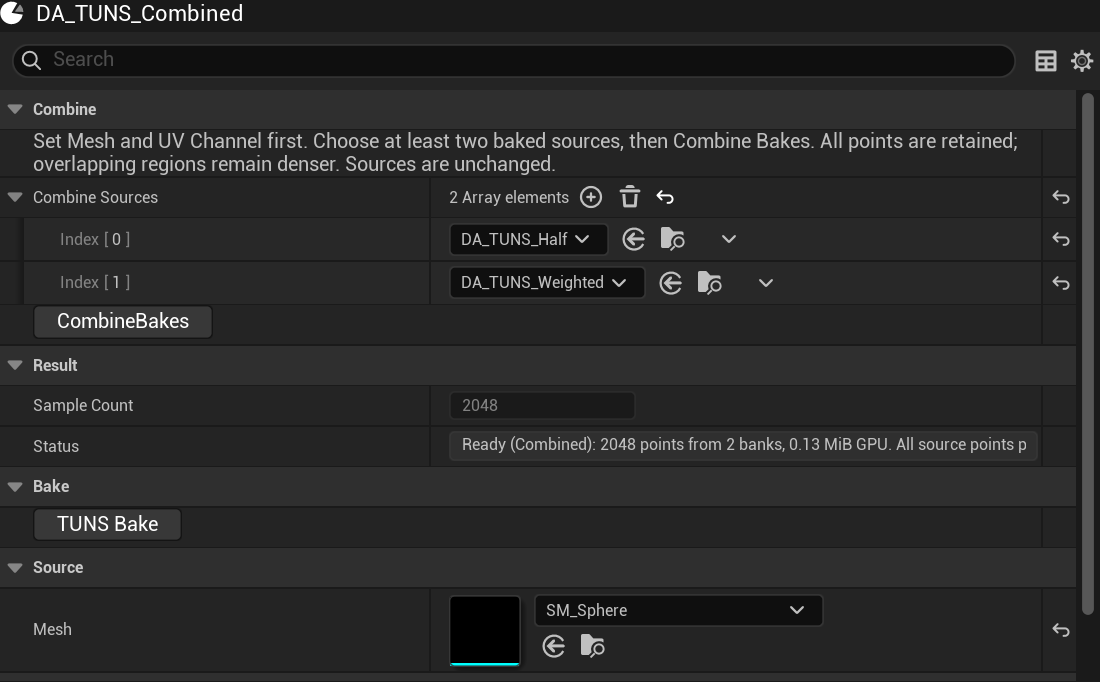
- Bake at least two assets using the same mesh and UV channel. Different masks are useful here.
- Create a separate destination bake. Set its Mesh and UV Channel first.
- Add the ready source assets to Combine Sources.
- Click Combine Bakes. Confirm the combined Sample Count and Ready status.
- Assign the destination to Niagara’s Surface field.
- Sources
Current bakes for this mesh and UV channel.
- Combine Bakes
Pack all source points.
- Sample Count
The sum of the source counts.
Combining preserves positions and weights and interleaves banks proportionally. It does not relax spacing or remove duplicates between banks. Overlapping regions remain denser. Source assets are unchanged.
Maximum combined bank: 1,048,320 points. Self references, duplicate sources, stale sources and cycles are rejected. The destination’s Sample Bank Size does not choose the combined count.
Updated Oct 4, 2026