
Paint and tune a mask
Control allowed regions and relative point density.
- Paint using the mesh’s UV layout: black excludes an area; brighter values attract more samples.
- Assign Mask Texture and the matching UV Channel.
- Set Mask Channel: 0 = Red, 1 = Green, 2 = Blue, 3 = Alpha.
- Use Invert to swap high and low values. Threshold excludes values at or below its cutoff.
- Use Power to shape relative density. Values above 1 favor bright regions; values below 1 give darker regions more weight. Rebake.
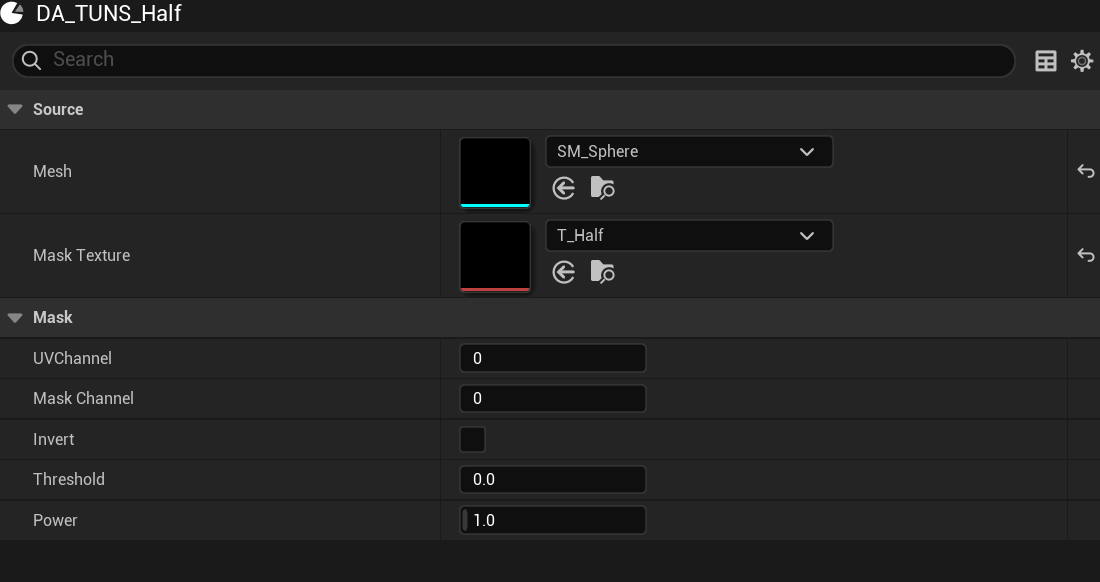
- Mask Texture
Paint for this mesh’s UV layout.
- UV Channel
The UV set on the mesh.
- Mask Channel
0 is Red; 3 is Alpha.
- Threshold
Exclude faint values.
- Power
Shape density in the remaining region.
| Mask | Result |
|---|---|
| None / white | Full available surface |
| Black | No valid sample locations |
| Black and white | The bank concentrates in white areas |
| Uniform gray above threshold | Still a full bank; gray is weight, not a count control |
| Gradient | More points in brighter areas |
The baker reads mask values as linear data from the source image, with bilinear sampling and UVs clamped to 0–1. It does not modify source texture compression or streaming settings.
Updated Oct 4, 2026