
Use the sampled attributes
Use TUNS outputs in later Niagara modules.
These are Niagara particle attributes. The sampler writes them before later modules run.
| Attribute | Use |
|---|---|
| Particles.Position | Position already set by the sampler, including NormalOffset. |
| Particles.TUNS.Position | Stored sampled position, including the offset. Useful as an effect origin. |
| Particles.TUNS.Normal | Surface normal; use for outward motion or orientation. |
| Particles.TUNS.UV | UV at the sample; use for color or reveal textures. |
| Particles.TUNS.MaskWeight | Baked density weight; use for brightness or size. |
| Particles.TUNS.TriCoord | Triangle and barycentric coordinate for this sample. |
| Particles.TUNS.Triangle | Triangle index. |
| Particles.TUNS.Velocity | Skeletal velocity; zero for the static module. |
| Particles.TUNS.Valid | Whether the sample is usable. Invalid samples are also marked not alive. |
Example: inherit the mesh’s motion
- Use the skeletal sampler in Particle Spawn. Add Set Variables immediately after it.
- Add
Particles.Velocityto Set Variables. Open its value menu and bindParticles.TUNS.Velocity. - Keep Solve Forces and Velocity in Particle Update. It integrates that velocity as the particle moves.
- Play the skeletal animation. Each new particle receives the surface velocity at its birth; it can then move independently.
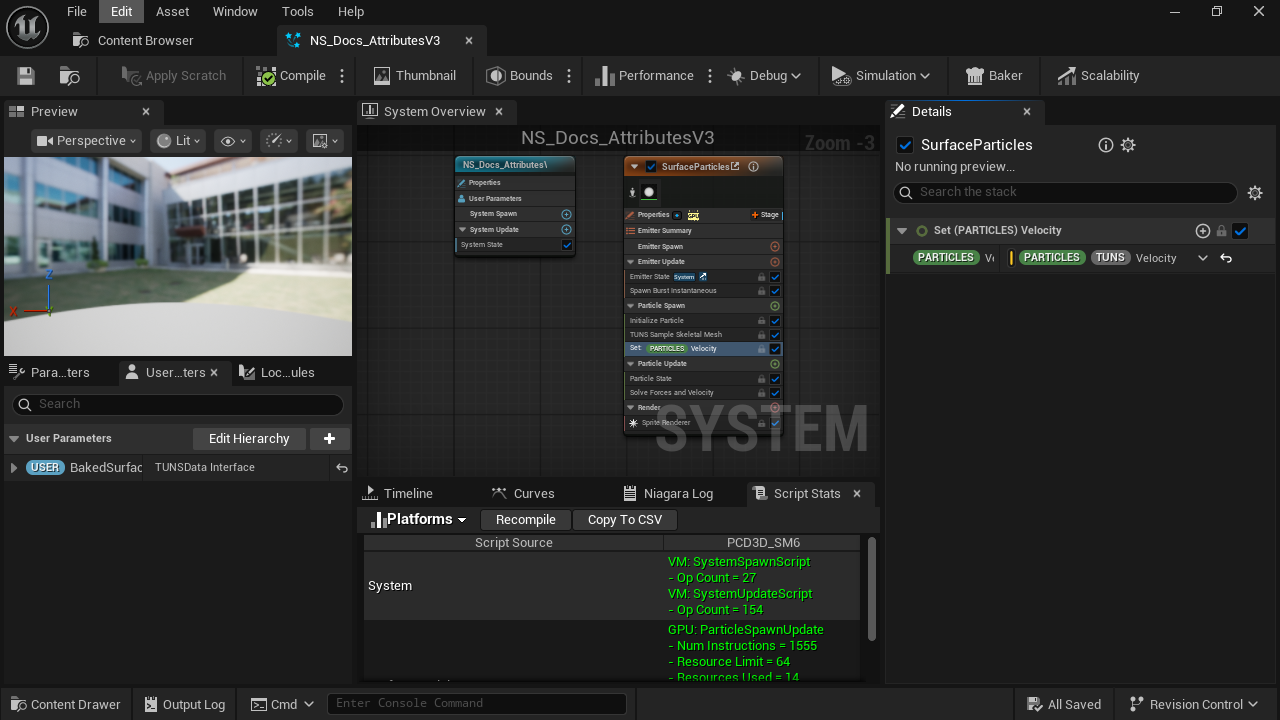
- Set Variables
Place after TUNS so the sampled attributes exist.
- TUNS.Velocity
Bind this as the value of Particles.Velocity.
- Solve Forces and Velocity
Integrates the particle’s movement in Update.
For outward motion, use Particles.TUNS.Normal × Speed instead. For texture color or reveal effects, use Particles.TUNS.UV as the texture coordinates.
Updated Oct 4, 2026